
Environment Daylight
Environment Daylight
Using the Daylight Environment Shader
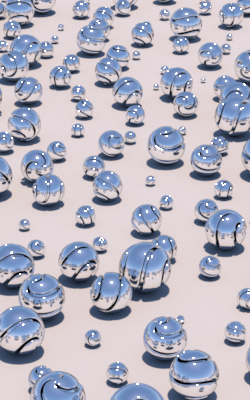
Noon |
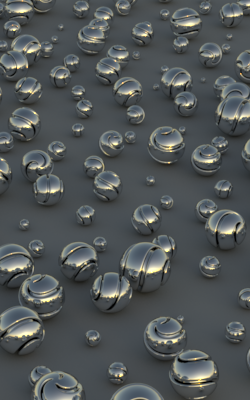
Dusk |
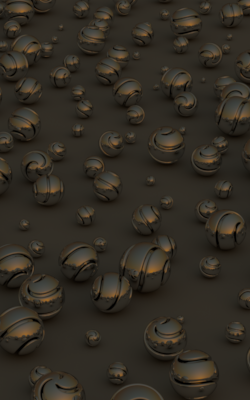
Dusk under haze |
An environment light source that implements a simple analytical physical model for terrestial daylight under clear skies. The sky model is based on A Practical Analytic Model for Daylight by A.J. Preetham, Peter Shirley, and Brian Smits. The solar disk model is adapted from H.C. Hottel's A Simple Model for Estimating the Transmittance of Direct Solar Radiation Through Clear Atmospheres, with parameters curve fitted for turbidity from physical data and a simple limb darkening model.
In typical use you will create an envsphere as the geometry and attach this as a light source shader to it. To make the sky directly visible to the camera, add the PxrLightEmission material as the Bxdf as well.
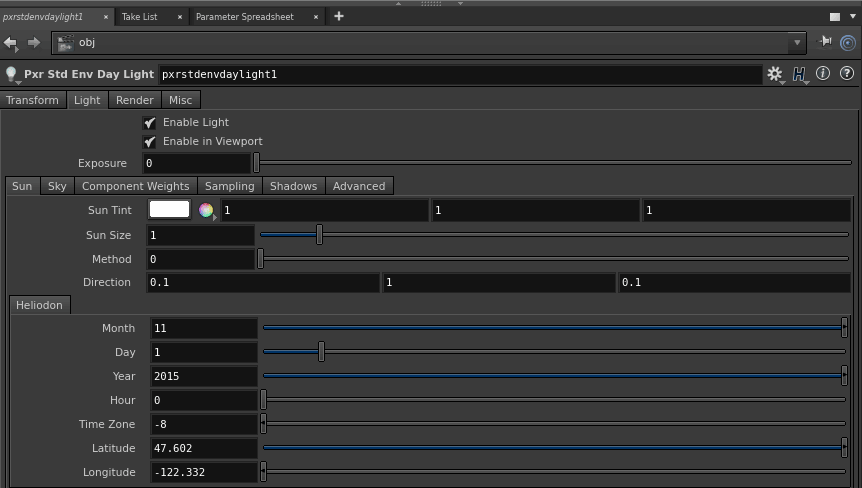
PxrStdEnvDayLight Interface
Since Houdini rotates environments differently than RenderMan, you will need to change the rotations on the Environment Daylight shader to correctly render an upright environment.
Tip:
You should rotate -90 degrees in X
Find out more by looking at the section on Environment Light Orientation.
Parameters
Exposure
Exposure specifies the intensity of the environment light as a power of 2. Increasing the intensity by 1 will double the energy emitted by the light source. A value of 0 produces an intensity of 1, -1 produces .5.
The light intensity is computed using physical units which are typically 100.000 times too intense for regular RGB rendering. We scale it internally by 1e-e5 to generate pleasing illumination levels.
The intensity parameter in the Advanced section can also be used to lineary scale the light intensity.
RIB: float exposureDefault: 0
Sun Parameters
Sun Tint
Tweak the sun's contribution and color. The default, white, gives results based on measured physical values.
RIB: color sunTintDefault: 1.0,1.0,1.0
Sun Size
Scale the apparent size of the sun in the sky. Leave at 1 for a realistic sun size with an 0.55 degree angular diameter.
RIB: float sunSizeDefault: 1.0
Method
The sun direction can either be specified as a vector or using the heliodon. This setting is either 0 or 1. Despite how this is exposed in RfH, values other than 0 will use the heliodon method for rendering.
The default location is Seattle, Washington USA.
RIB: float methodDefault: 0 (vector)
Direction
The apparent direction towards the center of the sun. The zenith is at +Y (for noon light) and the horizon is in the XZ plane (for sunrise/set). Note that the Y component must non-negative.
RIB: vector directionDefault: 0.1 1.0 0.1
Heliodon
Month
Month of the year, 1 through 12.
RIB: float monthDefault: 11
Day
Day of the month, 1 through 31.
RIB: float dayDefault: 20
Year
Four digit year.
RIB: float yearDefault: 2014
Hour
Hours since midnight, local standard time. May be fractional to include minutes and seconds. If daylight saving time is in effect, subtract 1 to correct to standard time.
RIB: float hourDefault: 14.633333
Zone
Standard time zone offset from GMT/UTC in hours. Positive for east, negative for west. For example, this would be -8 for Pacific time.
RIB: float zoneDefault: -8
Latitude
Latitude in degrees. Positive for north, negative for south. Ranges from -90 to +90 degrees.
RIB: float latitudeDefault: 47.601903
Longitude
Longitude in degrees. Positive for east, negative for west. Ranges from -180 to 180 degrees.
RIB: float longitudeDefault: -122.331817
Sky Parameters
Haziness
The turbidity of the sky. The lower limit of the model is 1.7 for an exceptionally clear sky, and 10, for an inversion, is the upper limit.
RIB: float hazinessDefault: 2.0
Sky Tint
Tweak the sky's contribution and color. The default, white, gives results based on measured physical values.
RIB: color skyTintDefault: 1.0,1.0,1.0
Components Weights
Specular Contribution
Scale the specular contribution of this light.
 RIB: color specAmountDefault: | 1.0 1.0 1.0 |
Diffuse Contribution
Scale the diffuse contribution of this light.
 RIB: color diffAmountDefault: | 1.0 1.0 1.0 |
サンプリング
Light sampling is automatic, but you may occasionally have to override the allocated sample budgets to clean up noise in direct lighting.
Fixed Sample Count
Override the automatic sample allocation and use a fixed number instead. Negative values disable this feature.
RIB: float fixedSampleCountDefault: -1
Importance
Re-balance the automatic sample allocation. An importance of 2 will allocate twice the regular sample budget to this light.
This method is often preferable to Fixed Sample Count, as it only biases the automatic estimates.
RIB: float importanceDefault: 1.0
Shadows
Enable Shadows
Enable ray-traced shadows.
RIB: float enableShadowsDefault: 1
Shadow カラー
The color of the shadows cast by emitted light.
RIB: color shadowカラーDefault: | 0 0 0 |
Adaptive Shadows
Adaptively sample the lights shadows.
Conservative mode will trace a larger percentage of the shadow rays, which will result in less acceleration, but potentially higher quality shadows.
Aggressive will trace fewer rays, which can result in more significant speedups.
RIB: float adaptiveShadowsDefault: 1
Shadow Max Distance
Limits the shadow distance. Any value smaller or equal to 0.0 will be ignored and the shadow distance will be unlimited. Defaults to -1 : unlimited shadow distance. Can be used to optimize shadow rays in very large scenes but may introduce artefacts if set too short. Use a small value with a white environment light to achieve a short-range ambient-occlusion look.
RIB: float shadowMaxDistDefault: -1
Shadow Trace Bias
Ray tracing bias for shadow computations. -1 uses the automatically computed bias value.
RIB: float shadowTraceBiasDefault: -1
Shadow Subset
Set of geometry to consider for traced shadow intersection. The default is everything is considered for shadow tracing.
RIB: string shadowSubsetDefault: ""
Don't Trace Subset
- Set of geometry to ignore for traced shadow intersection. This setting has the opposite
- meaning of the Shadow Subset parameter above.
RIB: string shadowExcludeSubsetDefault: ""
Advanced Parameters
Light Group
Specify the group membership used for per-light AOVs.
RIB: string __groupDefault: "environment"
Intensity
Scales the contribution of this light.
RIB: float intensityDefault: 1.0