
Fur and Hair
Fur and Hair
RenderMan for Maya supports Maya Fur and Hair, as well as Joe Alter's Shave and a Haircut and custom fur/hair generators, for the creation of convincing fur effects. Fur and hair is fully supported, from keyframe animation to dynamic simulations. RfM will automatically render Maya fur and hair, requiring no additional setup.
RenderMan renders these effects fast and efficiently, although rendering fur can be an computationally expensive operation. In addition, both fur and hair are rendered as another scene element in software (RenderMan does not treat fur as a post-process effect), which allows full integration for anti-aliasing, shadows, etc.
Improvements in RMS 4 and RPS 17
For years the conventional wisdom when it comes to rendering fur and hair has been that ray tracing is too expensive. Fundamental changes to the RiCurves primitive in PRMan 17, however, have made ray tracing curves both faster and more memory-efficient. Additionally, RMS 4 includes two new, physically plausible hair shaders - RMSHair and RMSShaveHair (the latter for use with Joe Alter's Shave and a Haircut - designed for optimal ray-traced performance.
Note, however, that the traditional workflows, described below, are still valid. Although ray tracing hair will provide more accurate results, users should choose a workflow based on their resources.
Fur and Deep Shadows
Shadows can give fur the added depth needed for exceptional realism, and Pixar's Deep Shadows are ideal for this purpose. Deep Shadows are capable of creating soft, subtle shadows, free of artifacts. They are more expensive than traditional shadow maps, but are well worth it when rendering fur, due to issues associated with using traditional shadow maps and fur. As shown in the image below, fur with traditional shadow maps has several undesirable artifacts, especially in animation. Deep Shadows, however, are perfect for use with fur.
Fur with Depth Map Shadows
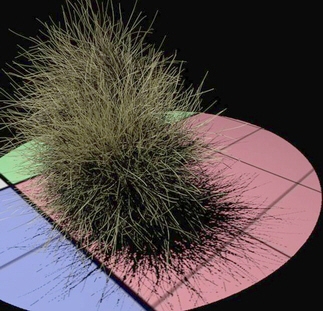
In this image, the shadow on the floor has the artifacts that typically occur when using traditional shadow maps and fur. The only way to compensate for this is by dramatically increasing the resolution of the shadow map, which has its own issues. These artifacts will pop and flicker when animated.
Fur with Deep Shadows
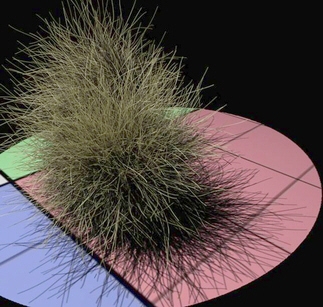
With Deep Shadows, the shadows of the fur are much better looking. Deep Shadows allow the shadow to be filtered, eliminating blocky artifacts. Deep Shadows also can be semi-transparent, which adds additional character to the fur, and they look totally excellent when animated.
For information about fur workflow see the Fur and Hair Tutorial.